

Templates
Choose from a gallery of starter templates to kickstart your static site on YWT hosting.
Templates
Templates give you a ready-made starting point so you do not have to build everything from scratch. After creating a site, open its Edit tab while it is still empty, open Advanced, and choose a template from the gallery. YWT copies the template files into your draft so you can customize them as code.
If you do not want to edit code, use Create a page instead. See Create a page without code.
Available templates
YWT includes a growing library of templates designed for common use cases. All templates are lightweight, responsive, and built with plain HTML, CSS, and JavaScript — no build tools or frameworks required.
| Template | Description | Best for |
|---|---|---|
| Minimal Portfolio | Clean, modern portfolio for creatives and designers. | Freelancers, designers, developers |
| Creative Agency | Bold dark-mode site for agencies and studios. | Agencies, studios, small teams |
| Photography Portfolio | Immersive dark gallery for photographers. | Photographers and visual portfolios |
| Business Landing | Professional landing page for small businesses. | Company pages and service offers |
| Restaurant & Cafe | Menu and reservation-oriented site for dining. | Restaurants, cafes, pop-ups |
| Tech Conference | Event site with schedule and speakers. | Conferences and meetups |
| Documentation | Technical documentation layout with a sidebar. | Project docs and knowledge bases |
| Product Launch | Landing page for product announcements. | Launches and campaigns |
| Coming Soon | Simple pre-launch page you edit as code. | Launches |
| Personal Blog | Blog layout for writers and bloggers. | Personal publishing |
| RSS Feed | News reader layout with a sample RSS feed. | News and feed-style pages |
index.html.Only want a placeholder on a domain you registered at YWT? You do not need a template or a plan for that: see Put a page on your domain. The template above is for a coming-soon page you want to edit as code inside a regular site.
Selecting a template
You choose a template under Advanced on the empty Edit tab, which says Nothing here yet.
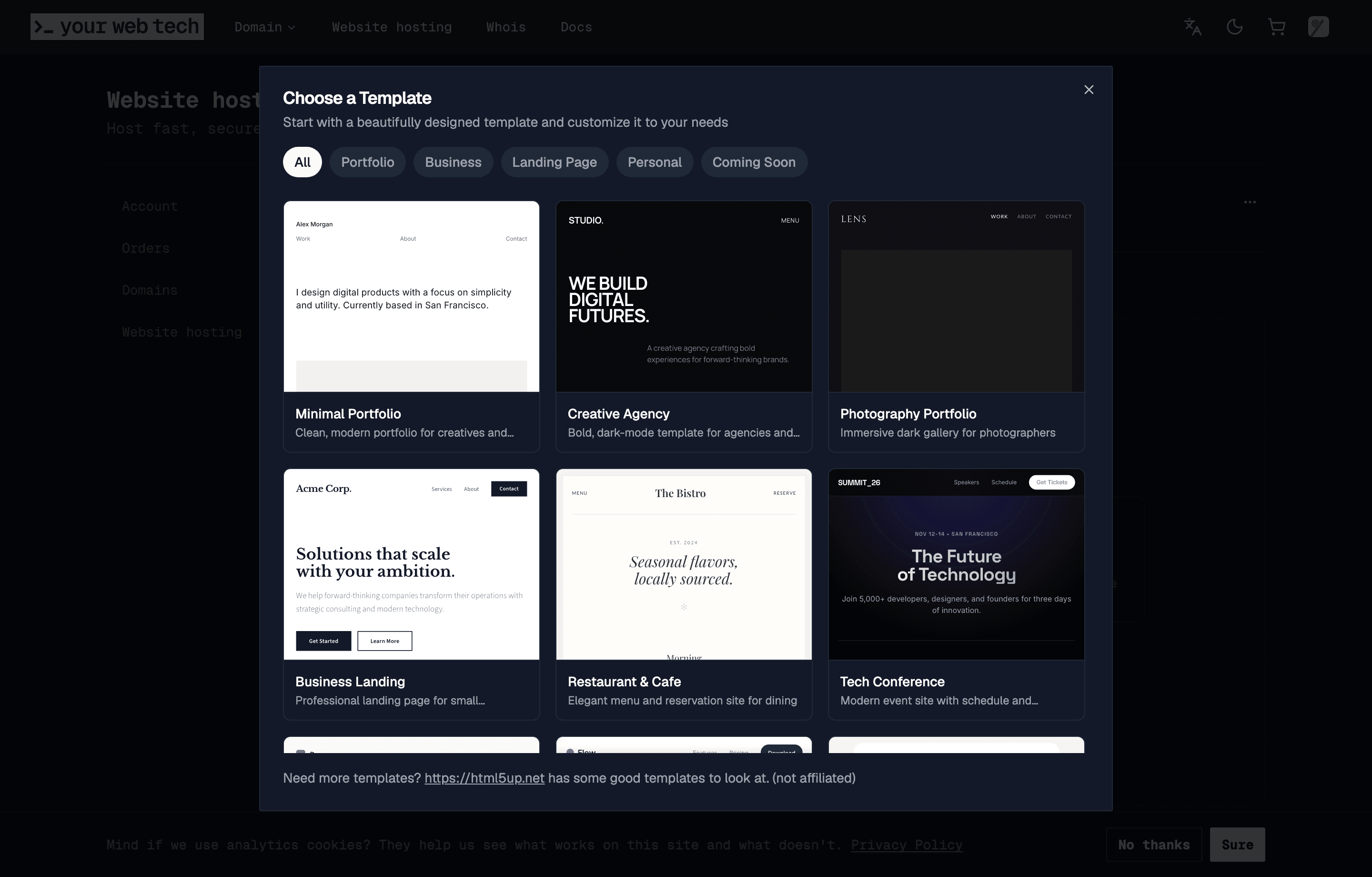
Open the template picker
After you create a new site, open the site's Edit tab, open Advanced, and click Choose a Template. The gallery displays a visual preview card for each template.
Browse and preview
Click on any template card to see a larger preview and a short description of what files are included. Take your time — you can scroll through the full gallery before deciding.
Select and create
Click the apply button for the template you want. YWT clears your current draft, copies the template files into it, and returns you to the editor.
What templates include
Each template ships with a complete set of files that you own and can modify freely:
- HTML files — One or more
.htmlpages with semantic markup. - CSS files — Stylesheet(s) with the template's design. All styles are plain CSS with no preprocessor dependency.
- JavaScript files — Optional scripts for interactivity (menu toggles, scroll effects, etc.).
- Assets — Some templates include placeholder images or icons in an
assets/folder.
All files appear in the editor's file tree immediately after creation.
Templates are a starting point, not a constraint. After your site is created, every file is fully editable. You can rename, delete, or add new files at any time using the built-in editor.
Starting without a template
If you prefer to start from a simple generated file, choose Start Fresh under Advanced on the empty Edit tab. YWT creates an index.html starter file. From there you can add any files you need.
Next steps
- Open the editor to customize your template files.
- Deploy your site to publish your changes.