

What Is DNS? A Beginner's Guide
What is DNS? It is the internet address book that turns a domain like example.ch into a website. A plain-language guide to how DNS works.
What is DNS?
DNS, the Domain Name System, is what lets you type example.ch instead of a string of numbers to reach a website. This guide explains what DNS is, how a lookup works, and how it all connects to your .ch or .li domain. You do not need any background to follow it.
If you already have a domain with YourWebTech and just want to add or edit records, the DNS manager guide has the click-by-click steps. Read this page first if you want to understand what is happening underneath.
DNS in one sentence
Computers find each other using IP addresses, numbers like 185.12.7.49 or 2001:db8::1. People are bad at remembering numbers and good at remembering names. DNS is the system that translates the names we type into the numbers computers need.
Think of it as the contacts app on your phone. You tap "Mum," not her phone number. DNS does the same job for the whole internet: you ask for example.ch, and DNS hands back the address your browser should connect to.
What problem does DNS solve?
Every device on the internet, including the server that stores a website, is reachable at an IP address. Those addresses change. A site can move to a new host, switch providers, or sit behind several servers at once.
If web addresses were just IP numbers, every move would break every link and bookmark pointing at the old number. DNS adds a layer of names on top, so the name stays the same even when the underlying address changes. You update one DNS record, and the name now points somewhere new. Nobody has to learn a new address.
How a DNS lookup actually works
When someone opens example.ch, their device does not magically know where that is. It asks a chain of servers, each one pointing a step closer to the answer. The whole exchange usually finishes in a few milliseconds.
A resolver takes the question
The visitor's device hands the name to a DNS resolver, usually run by their internet provider or a public service like Cloudflare (1.1.1.1) or Google (8.8.8.8). The resolver's job is to chase down the answer on the visitor's behalf.
The root points to the right registry
If the resolver has no cached answer, it starts at the top, with the DNS root servers. The root does not know about example.ch specifically. It knows who runs .ch, and sends the resolver there.
The registry points to your nameservers
For .ch and .li, that registry is SWITCH, the official operator of both. The registry knows which nameservers are authoritative for example.ch and replies with their names.
The nameserver returns the record
Finally the resolver asks one of those authoritative nameservers for the record it wants, often an A record holding the website's IP address. The nameserver answers, the resolver caches it, and the browser connects.
This is the DNS hierarchy: a tree that starts at the root, branches into top-level domains like .ch, and ends at the nameservers responsible for a single domain. The product doc on how DNS works walks through the same flow from a YWT account's point of view.
There are 13 root server identities, labelled A through M and run by 12 organisations, but the physical infrastructure is much larger: those identities are served from more than 1,500 machines worldwide using anycast routing, coordinated by IANA. So "the root" is really a global fleet, not 13 boxes in a room.
The parts of DNS, in plain words
A few terms come up again and again. Here is what each one means without the jargon.
- Resolver. The middleman that does the asking for you and caches answers so the next lookup is faster.
- Nameserver. A server that holds the authoritative answers for a domain. When you register with YWT, your domain is assigned YWT nameservers by default.
- Zone. The full set of records for one domain, kept together as a unit. Editing your DNS means editing your zone.
- Record. A single entry in the zone, such as "send web traffic to this IP" or "send email to that mail server."
- TTL (time to live). How long a resolver is allowed to cache a record before checking again, measured in seconds.
For the full alphabet of terms, the glossary is a quick reference.
The DNS records you will meet in practice
A DNS zone is just a list of records, each with a type that says what it does. You will only touch a handful in practice:
- A and AAAA point a name at a server's IPv4 or IPv6 address. This is how a domain reaches a website.
- CNAME makes one name an alias of another, often used to point
wwwat a hosting provider. - MX tells the world which mail server handles email for the domain.
- TXT stores text, used for things like email authentication (SPF, DKIM, DMARC) and proving you own a domain.
That is enough to recognise what you are looking at. When you need the exact fields and syntax, the DNS record types reference lists every type YWT supports, with examples.
Registering, DNS, and hosting are three different things
This trips up almost everyone at the start, so it is worth being clear. Buying a domain does not put a website online by itself. Three separate things have to line up:
- Registration reserves the name. You own
example.chand nobody else can take it. This is what happens when you register a domain. - DNS decides where the name points. Without records, a registered domain leads nowhere.
- Hosting is the actual server storing your website's files.
DNS is the wiring between the name you registered and the server that hosts your pages. You can own a domain with no website, host a website with no custom domain, or change either side without touching the other. They are independent on purpose.
Why DNS changes are not instant
Edit a record and you might expect it to take effect everywhere at once. It does not, and TTL is the reason. Resolvers around the world cache records for the length of their TTL, so some keep serving the old value until their copy expires. That gradual rollout is called propagation.
Most changes settle within an hour, though nameserver changes can take longer. If you are planning a migration or a launch, the guide on DNS propagation explains how to lower TTLs ahead of time so changes go live quickly.
DNS for your .ch or .li domain at YWT
For Swiss and Liechtenstein domains, SWITCH runs the registry, and an accredited registrar like YourWebTech handles your domain on your behalf. You never talk to SWITCH directly. When you register with YWT, we create the DNS zone, assign YWT nameservers, and give you a panel to manage every record yourself.
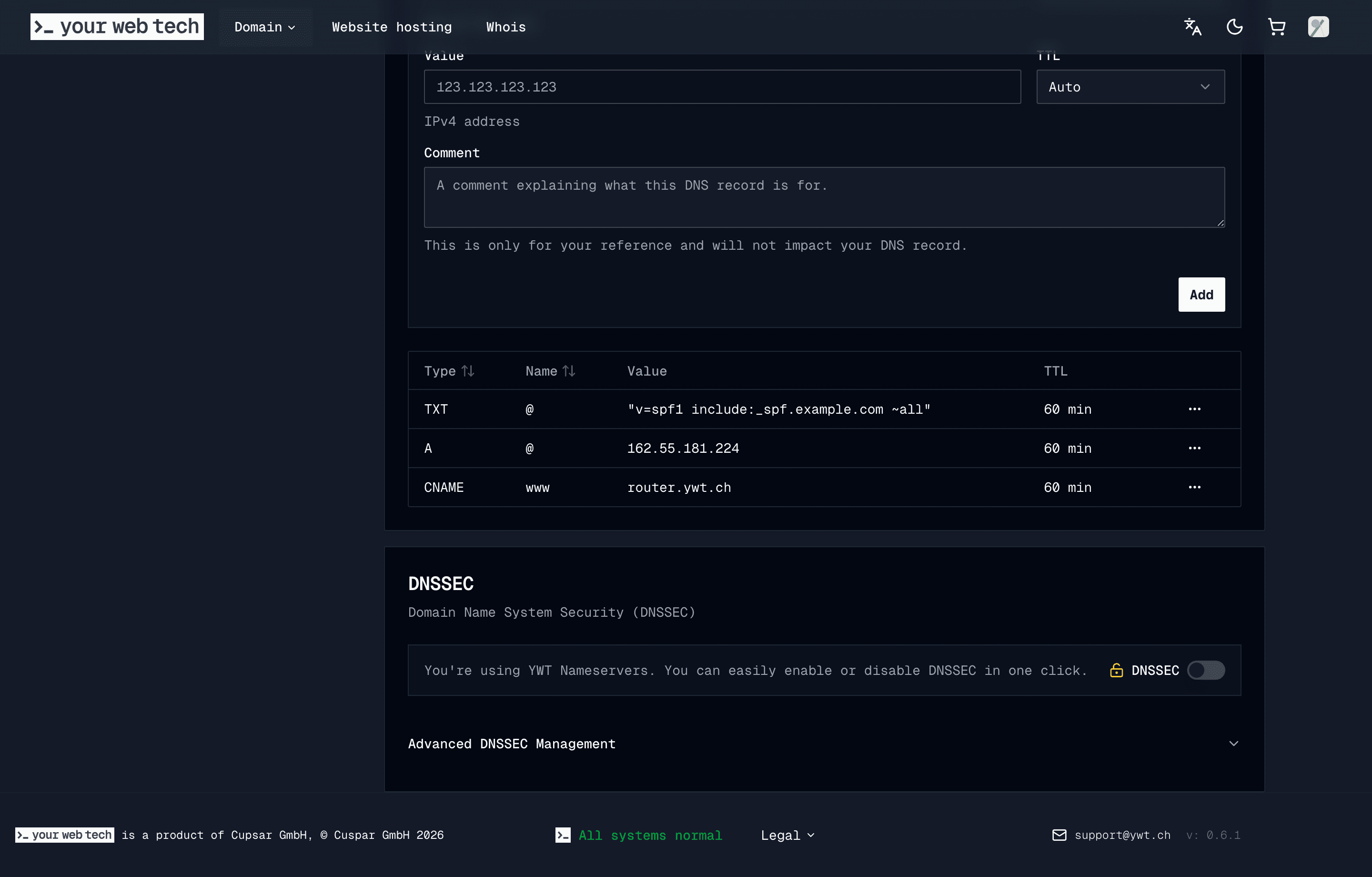
From there you can:
- Add and edit records in the DNS manager.
- Point a domain at a YWT-hosted site, which gets automatic HTTPS.
- Turn on DNSSEC so resolvers can verify your answers have not been tampered with.
- Switch to external nameservers if you would rather manage DNS elsewhere.
Frequently asked questions
What does DNS stand for?
Domain Name System. It is the internet's naming system, translating human-readable names like example.ch into the IP addresses computers use to connect.
What is DNS in simple terms? It is an address book for the internet. You give it a domain name, and it returns the address of the server to connect to, so you never have to memorise raw IP numbers.
Is DNS the same as my domain or my web host? No. Registering a domain reserves the name, hosting stores your website, and DNS is the link that points the name at the host. They are three separate things you can change independently.
Why does my DNS change not show up yet? Resolvers cache records for the length of their TTL, so a change can take time to reach everyone. Most updates settle within an hour. See DNS propagation for the details.
Who controls DNS for a .ch domain?
SWITCH operates the .ch and .li registry on behalf of the Swiss Confederation and Liechtenstein. Your registrar (such as YourWebTech) manages your domain's records day to day. You control the records through your account.
Do I need to understand DNS to use my domain? Not deeply. YWT sets up sensible defaults when you register, so a domain connected to YWT hosting works without manual DNS edits. Understanding the basics helps when you add email or other services later.
Next steps
- What is DNS? (DNS at YWT) for the product overview and management panel.
- Manage DNS records to add or edit records in your account.
- DNS record types reference for every record type and its fields.
- Register a .ch or .li domain to get your own name.
Sources
- SWITCH, the registry for .ch and .li, and the Swiss OFCOM page on .ch internet domain names.
- ICANN, Brief Overview of the Root Server System, and root-servers.org for root server identities and anycast instances.
Last updated: 2026-06-03.
Domain Registration vs Website Hosting
Domain registration vs website hosting: what each one does, why they are separate, and how to switch web hosts without transferring your .ch domain.
What Is DNSSEC and Do You Need It?
What is DNSSEC? It is a security layer that stops attackers forging DNS answers. Here is how it works, who needs it, and how to turn it on.