

Nameservers
Understand nameserver settings, switch between YWT and external DNS providers, and learn what happens when you change nameservers.
Nameservers
Nameservers are the foundation of your domain's DNS. They determine which DNS provider answers queries for your domain. When someone types your domain into a browser, the nameservers tell the internet where to find the DNS records that point to your website, email server, and other services.
YWT nameservers (default)
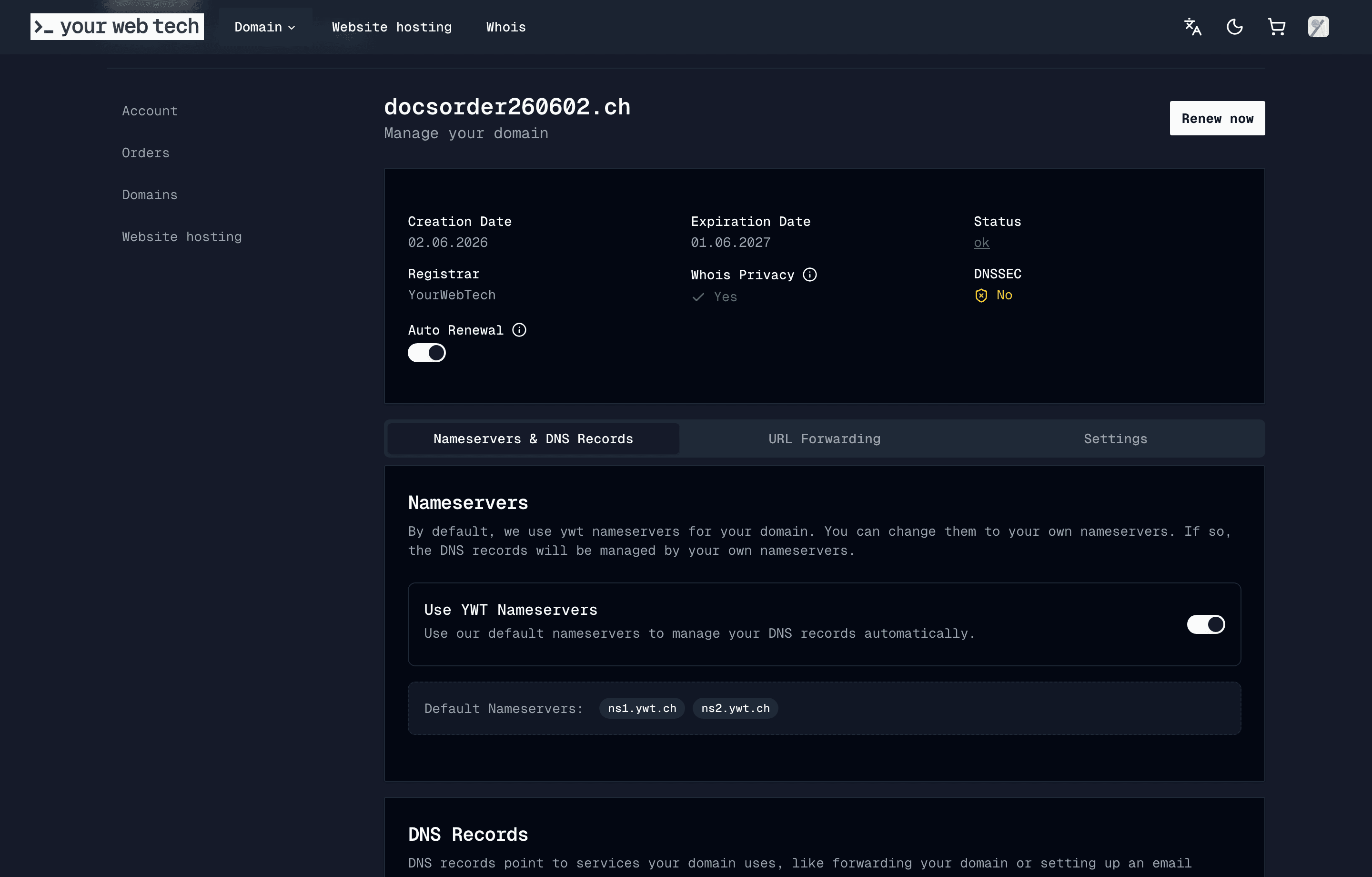
When you register or transfer a domain to YWT, it is configured with YWT nameservers by default:
ns1.ywt.ch
ns2.ywt.ch
With YWT nameservers active, you manage DNS records from the domain's Nameservers & DNS Records tab using the DNS manager.
Custom / external nameservers
You can point your domain to external nameservers if you prefer to manage DNS with another provider such as Cloudflare, AWS Route 53, or Hetzner DNS. When you use external nameservers, the YWT DNS manager is bypassed — all record management happens at the external provider.
Viewing your nameserver settings
Open domain settings
Log in to your YWT account, go to Domains, and select the domain you want to configure.
Go to the Nameservers section
In the domain detail view, open Nameservers & DNS Records. The nameserver card shows the currently active nameservers.
Switching to external nameservers
If you want to use an external DNS provider (for example Cloudflare), follow these steps:
Set up your zone at the external provider
Before changing nameservers, create a DNS zone for your domain at the external provider and add all the records you need (A, CNAME, MX, TXT, etc.). This ensures there is no downtime during the transition.
Note the external nameservers
Your external provider will give you nameserver addresses, for example:
ada.ns.cloudflare.com
bret.ns.cloudflare.com
Update nameservers at YWT
In the nameserver card at YWT, replace the YWT nameservers with the ones from your external provider. Save the changes.
Wait for propagation
Nameserver changes are processed at the registry level (.ch or .li). This typically takes a few minutes but can take up to 24 hours. During this time, some resolvers may still query the old nameservers.
Verify the switch
Use a tool like dig NS example.ch or an online DNS checker to confirm that your domain is now resolving through the new nameservers.
Changing nameservers affects all DNS records. When you switch away from YWT nameservers, the records you configured in the YWT DNS manager will no longer be served. Make sure you have recreated all necessary records at your new DNS provider before making the switch.
Switching back to YWT nameservers
If you want to return to using YWT for DNS management:
Prepare your records in the YWT DNS manager
Before switching back, log in to YWT and add all the DNS records you need in the DNS tab. The records will not be active until the nameservers point back to YWT, but having them ready prevents downtime.
Update nameservers back to YWT
In the nameserver card, set the nameservers back to:
ns1.ywt.ch
ns2.ywt.ch
Wait for propagation and verify
As with any nameserver change, allow time for propagation and then verify using a DNS lookup tool.
DNSSEC considerations
Disable DNSSEC before changing nameservers. If DNSSEC is enabled, the DS record at the registry points to keys managed by your current DNS provider. Changing nameservers without updating or removing the DS record will cause DNSSEC validation failures, which can make your domain completely unresolvable. Always disable DNSSEC first, change nameservers, wait for propagation, and then re-enable DNSSEC with the new provider's keys. See DNSSEC for the full procedure.
Frequently asked questions
Can I use more than two nameservers? Yes. Some providers give you three or more nameserver addresses. You can add all of them for better redundancy.
Will my website go down during a nameserver change? If you prepare your DNS records at the new provider before making the switch, there should be little to no downtime. Resolvers that still have the old nameservers cached will query the old provider, while resolvers that pick up the new nameservers will query the new one.
How do I know which nameservers my domain is currently using?
Check the nameserver settings in your YWT domain detail page, or run dig NS yourdomain.ch from a terminal.