

Renew a Domain
How domain renewals work at YourWebTech — the reminder schedule, auto-renew charging, manual renewal invoices, and exactly what happens when a domain expires.
Renew a Domain
Keeping your domain active requires renewing it before it expires. YWT supports both automatic and manual renewal, and this page documents exactly when we remind you, when we charge, and what happens at each stage — so there are no surprises.
The renewal timeline
Every domain has an expiration date. As it approaches, YWT runs a fixed daily schedule of reminders and (for auto-renew domains) charge attempts. All times are Europe/Zurich.
| Days before expiry | Auto-renew ON | Auto-renew OFF |
|---|---|---|
| 37 – 31 | Email: Upcoming automatic domain renewal charge — a heads-up before any charge, so you can update your card or opt out first | — |
| 30 – 15 | First automatic charge attempt | Email: Domain(s) expiring in 30 days or less |
| 14 – 8 | Email: Domain(s) expiring in 14 days or less — only if a charge attempt has already failed; while your auto-renewal is on track you receive no alarming reminders | Email: Domain(s) expiring in 14 days or less |
| 7 – 2 | Charge retried if still unpaid | Email: Domain(s) expiring soon in 7 days or less |
| 1 – 0 | Email: Last Chance! Domain(s) expiring tomorrow (if unpaid) | Email: Last Chance! Domain(s) expiring tomorrow |
| Expiration day | Domain deleted in the evening if still unpaid | Domain deleted in the evening if still unpaid |
Each reminder email is sent once per renewal cycle — you will not receive the same reminder twice for the same expiration date. If you renew, the cycle resets for the following year.
Unpaid domains are deleted at the registry on the evening of the expiration date. After that point, recovery is not guaranteed — see What happens when a domain expires.
Auto-renew (recommended)
When auto-renew is enabled, YWT charges your default payment method automatically — you do not need to take any action.
How charging works, precisely:
- About a week before the first charge attempt (31–37 days before expiration) you receive an Upcoming automatic domain renewal charge email listing the domains and the payment method we will use — time to update your card or turn auto-renew off before anything is charged.
- The first charge attempt happens 15–30 days before expiration.
- If several of your domains are renewing at the same time, they are combined on a single invoice.
- If the charge fails, you receive an Auto renewal of domain(s) failed to charge email with a link to pay or update your payment method. We send this failure email at most once around the 30-day mark and once around the 7-day mark — not every day.
- Failed charges are retried at most once every 5 days, always against the same invoice. We never create duplicate invoices or double-charge for the same renewal.
- Once payment succeeds and the renewal is confirmed for processing, you receive an Auto renewal of domain(s) charged successfully email.
- If payment never succeeds, the final-warning email goes out the day before expiry, the open invoice is cancelled, and the domain is deleted on the expiration day.
We strongly recommend enabling auto-renew for all your domains. It is the simplest way to prevent accidental expiration, especially for domains tied to live websites or email.
Turning auto-renew off
- Go to Domains in your YWT account and select your domain.
- In the domain settings, switch the Auto-renew toggle off.
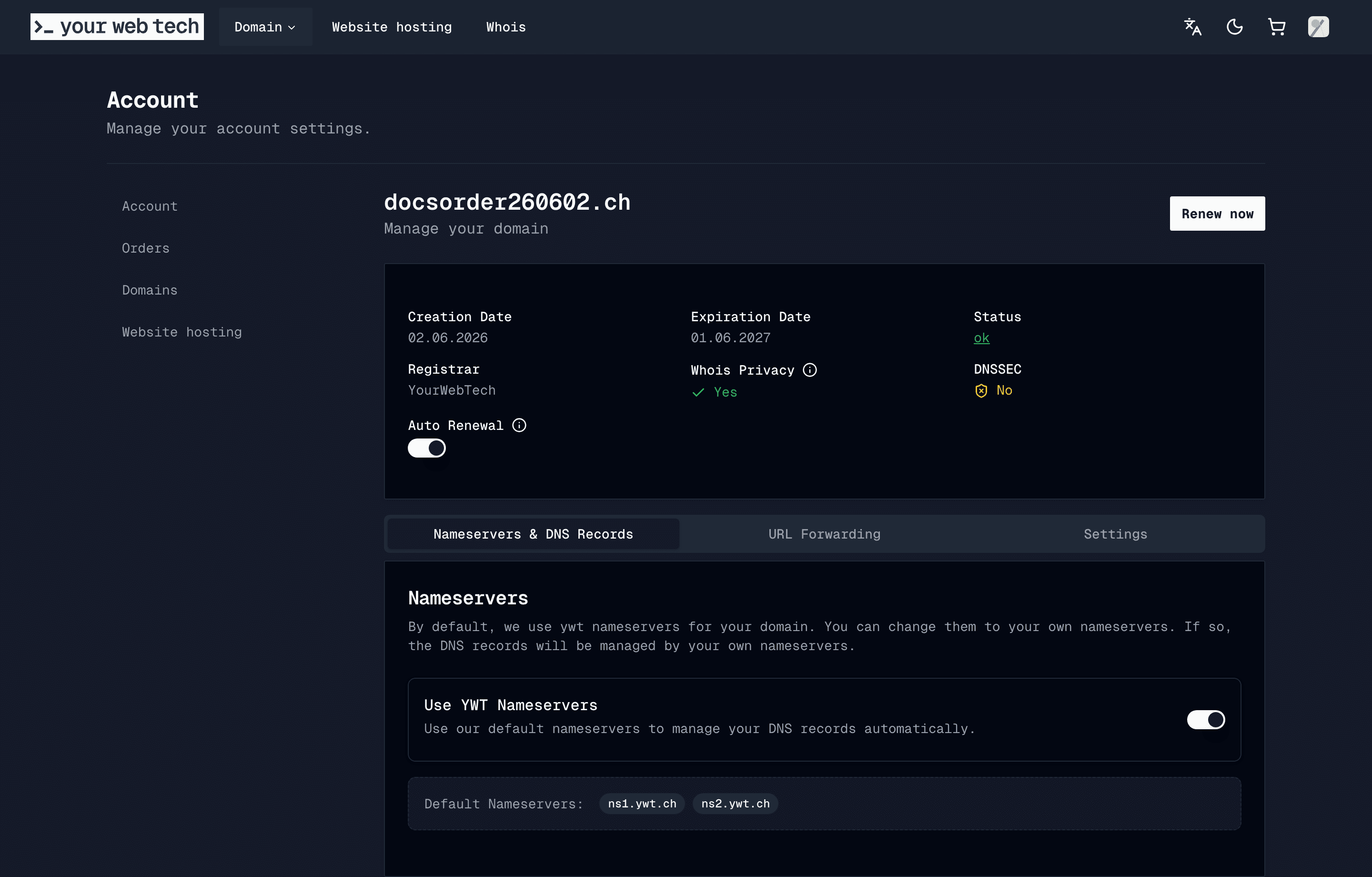
The opt-out takes effect immediately for future charge attempts. If a failed-charge invoice is still open for the domain at that moment, it is cancelled automatically within a day and no further charges are attempted — turning auto-renew off after a failed charge will not result in a surprise charge later.
One edge case: if the open invoice covers several domains and you disable auto-renew for only some of them, the invoice may still be charged in full so the other domains renew on time. Our team reviews these cases and refunds the opted-out domains; contact support if you see a charge you did not expect.
After opting out, you receive the normal reminder emails (30, 14, 7 and 1 day) instead of charge attempts.
Manual renewal
If you prefer to renew manually, you pay a renewal invoice yourself through checkout.
Open your domain settings
Log in to your YWT account and go to Domains. Select the domain you want to renew.
Click Renew Now
YWT creates a one-year renewal invoice and takes you straight to checkout — renewals no longer pass through the shopping cart. A domain can have one pending renewal order at a time; if a renewal is already invoiced, the button takes you back to that existing checkout instead of creating a second one.
Complete payment
Review the renewal price and confirm payment. See Pricing for current rates.
An unpaid manual renewal invoice stays payable all the way through the final day before expiration — including after the last-chance reminder. It is only cancelled on the expiration day itself, immediately before the domain is deleted. If you intend to pay it, do so before the expiration date.
Paying several renewals at once
If more than one renewal invoice is open — for example after a few failed auto-charges or several domains expiring in the same period — the Amounts due page in checkout lists all of them. Pay all in one invoice combines every open renewal into a single invoice so one payment covers everything; the superseded individual invoices are cancelled automatically and can no longer be double-paid. The empty-cart page and the cart icon also link here whenever renewal payments are waiting.
When does the new expiration date appear?
Paying for a renewal — automatic or manual — immediately books a renewal credit on your domain. The domain is safe from deletion the moment payment succeeds.
The displayed expiration date, however, advances when the Swiss registry (SWITCH) confirms the renewal, which happens around the original expiration date rather than at payment time. This is normal for .ch and .li domains: if you renew 25 days early, the domain page shows the renewal as paid right away, and the new expiration date appears once the registry processes it. Your account reflects the registry confirmation shortly after it happens, and you receive a Domain(s) renewed confirmation.
Renewing early never costs you time. A domain expiring on 15 March 2027 that is renewed today gets a new expiration date of 15 March 2028.
What happens when a domain expires
If no renewal is paid by the expiration date:
- Deletion. On the evening of the expiration date (Europe/Zurich), YWT deletes the domain at the registry and marks it as expired in your account. You receive a Domain(s) expired notification email. Any unpaid renewal invoice for it is cancelled.
- Registry recovery. Recovery may still be possible depending on the registry state and timing, but it is not guaranteed. Contact support immediately if an important domain has expired.
- Release. If the domain cannot be recovered, it eventually becomes available for anyone to register through the registry.
A rare edge case: retroactive renewal
In exceptional situations the registry renews a domain at expiry even though no payment was made to YWT (for example, when registry processing and our deletion window overlap). When this happens the domain simply stays registered to you for another year, and YWT invoices the standard one-year renewal fee for it retroactively — you receive the invoice by email. You keep the domain; you pay the normal price; nothing is lost. If you did not want to keep the domain, contact support.
All renewal-related emails at a glance
| Email subject | When it is sent |
|---|---|
| Upcoming automatic domain renewal charge | 31–37 days before expiry (auto-renew on), before any charge attempt |
| Domain(s) expiring in 30 days or less | 15–30 days before expiry (auto-renew off, or first charge failed) |
| Domain(s) expiring in 14 days or less | 8–14 days before expiry; auto-renew domains only after a failed charge |
| Domain(s) expiring soon in 7 days or less | 2–7 days before expiry (auto-renew off) |
| Auto renewal of domain(s) failed to charge | After a failed automatic charge (max once per reminder phase) |
| Auto renewal of domain(s) charged successfully | After a successful automatic renewal |
| Last Chance! Domain(s) expiring tomorrow | 0–1 days before expiry, all unpaid domains |
| Domain(s) expired | After an unpaid domain is deleted on the expiration day |
| Domain(s) renewed | When the registry confirms a paid renewal |
| We have received your payment | On any successful payment, including manual renewals |
Each is sent at most once per domain per renewal cycle. Multiple domains expiring together are grouped into a single email.
Frequently asked questions
Can I renew a domain for multiple years? The account flow currently creates one-year renewal items. Check the checkout summary for the exact term and price before payment.
I paid, but the expiration date still shows the old year. Is something wrong? No — this is expected. Payment books the renewal immediately; the registry advances the expiration date around the original expiry date. See When does the new expiration date appear?
I disabled auto-renew but still have an open renewal invoice. Will I be charged? No. The invoice is cancelled automatically within a day of the opt-out (unless it is shared with other domains that still have auto-renew enabled — see Turning auto-renew off).
What happens to my website and email if the domain expires? Once the domain stops resolving, your website and email on that domain stop working. Contact support immediately if an expired domain is business-critical.
I missed the expiration date. Can I still recover my domain? Contact YWT support immediately. Recovery depends on the registry state and is not guaranteed.