

Auto-renew
Learn how auto-renew works at YWT, how to enable or disable it per domain, and what happens when an auto-renew payment fails.
Auto-renew
Forgetting to renew a domain can mean losing it entirely. Auto-renew is the simplest way to let YWT renew your .ch and .li domains before expiry without manual checkout, as long as payment and registry processing succeed.
How auto-renew works
When auto-renew is turned on for a domain, YWT will:
- Start the 30-day renewal phase for domains expiring in the 15-30 day window.
- Attempt to charge your default payment method for auto-renew domains.
- Retry or remind in later 14-day, 7-day, and final 1-day phases if the renewal is still unpaid.
- Process the renewal after payment succeeds and registry processing confirms the renewal.
- Notify you by email whether the renewal succeeded or failed.
The normal process is automatic. You do not need to log in or take action unless payment, registry processing, or account state needs attention.
Enable auto-renew as early as possible after registering a domain. If you wait until the last moment, there may not be enough time for YWT to process the renewal before expiry — especially if your payment method requires additional verification.
Enabling or disabling auto-renew
You can toggle auto-renew on or off for each domain individually.
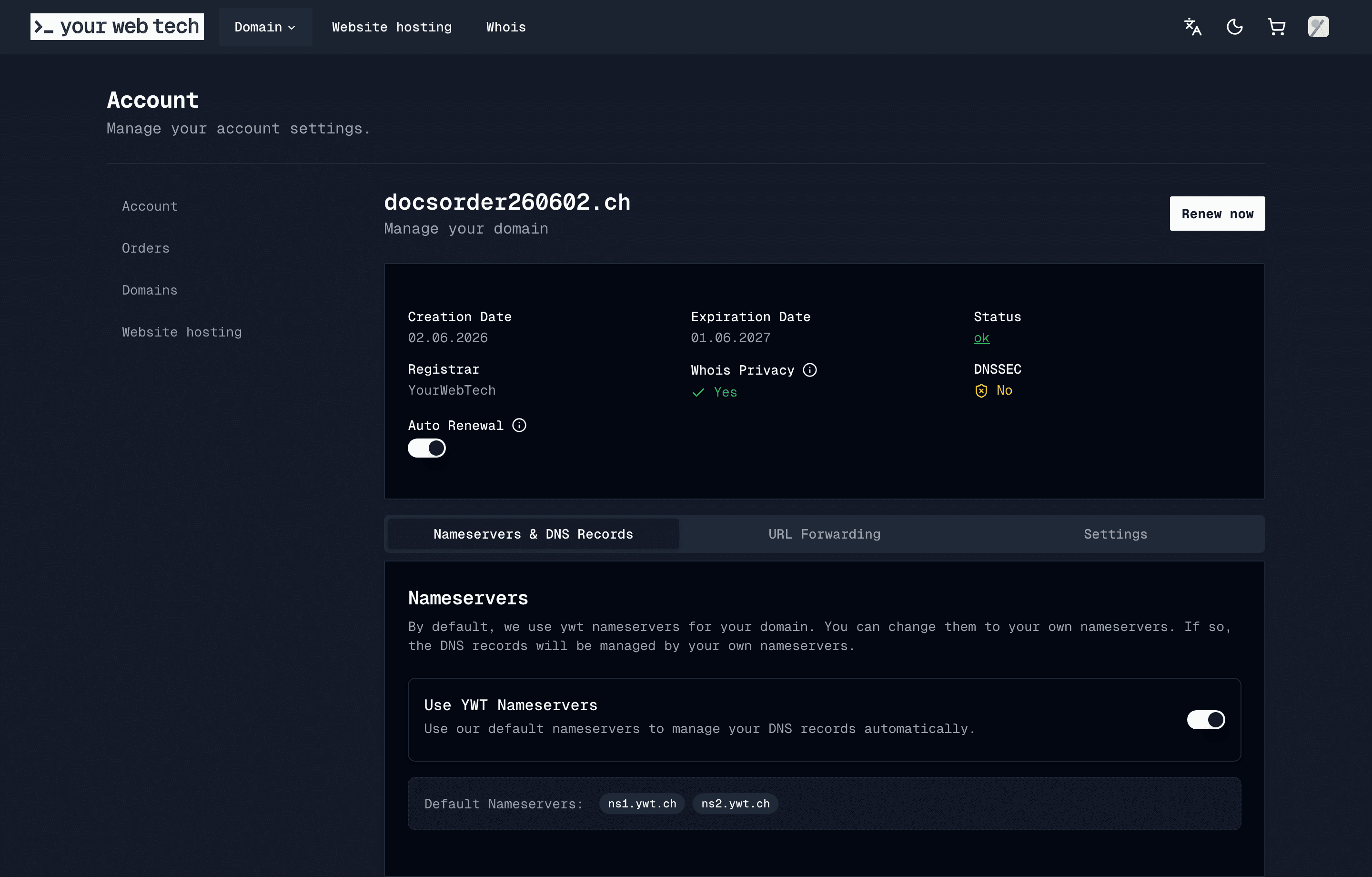
Open your domain settings
Log in to your YWT account and navigate to Domains in the account sidebar. Click the domain you want to configure.
Toggle auto-renew
In the domain settings panel, find the Auto-renew toggle. Switch it on to enable automatic renewal, or off to disable it.
Confirm the change
YWT saves the setting immediately. You will see a confirmation message at the top of the page. No further action is needed.
You can change the auto-renew setting at any time before the renewal window begins. Once a renewal has been initiated, it cannot be cancelled.
What happens when auto-renew payment fails
If the automatic payment does not go through, YWT will:
- Send you an email explaining that the renewal payment failed and asking you to take action.
- Keep the unpaid renewal order available so the renewal pipeline can retry or you can continue payment manually.
- Send additional reminders as the expiration date approaches.
If the payment is not resolved before expiration, the domain may expire and eventually become available for others to register. Recovery after expiration is not guaranteed.
For detailed steps on fixing payment issues, see Failed payments.
Frequently asked questions
Can I enable auto-renew for all my domains at once? Currently, auto-renew is configured per domain. You need to enable it individually for each domain in your account.
Will I be charged without warning? YWT sends reminder emails as the expiration date approaches. Keep your account email monitored and your default payment method current.
What payment method is used for auto-renew? YWT uses the default payment method on your account. Make sure it is up to date to avoid failed renewals.
Can I get a refund after auto-renewal? Contact YWT support as soon as possible if you were charged for a renewal you did not want. Refund availability depends on whether the renewal has already been processed at the registry level.